


Description:
Displays Elasticsearch information.
This add-on is very useful for deleting no longer used Elasticsearch indexes.
Note: this add-on only works on locally installed instances of Elasticsearch.
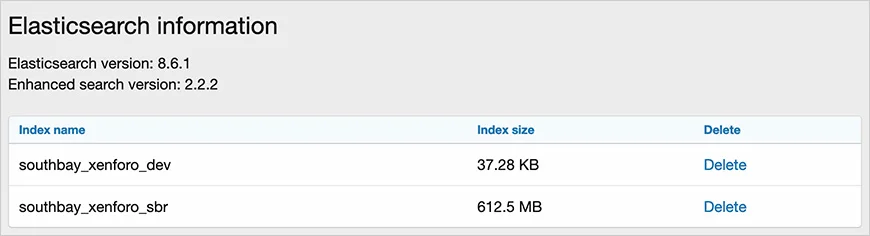
(Example of Elasticsearch information page)
Features:
Add 'elasticsearchinformation' to your forum URL. Must be an admin to view this page.
Note 1:
From the terminal you can use the following commands to check and or start Elasticsearch:
service elasticsearch status
service elasticsearch start
Note 2:
If Elasticsearch is not restarting when your do a System reboot, enter the following terminal command to have Elacticsearch automatically start when the system is rebooted:
systemctl enable elasticsearch
Displays Elasticsearch information.
This add-on is very useful for deleting no longer used Elasticsearch indexes.
Note: this add-on only works on locally installed instances of Elasticsearch.
(Example of Elasticsearch information page)
Features:
- Easily delete any Elasticsearch index.
- All phrases start with elasticsearchinformation_ for your convenience.
Add 'elasticsearchinformation' to your forum URL. Must be an admin to view this page.
Note 1:
From the terminal you can use the following commands to check and or start Elasticsearch:
service elasticsearch status
service elasticsearch start
Note 2:
If Elasticsearch is not restarting when your do a System reboot, enter the following terminal command to have Elacticsearch automatically start when the system is rebooted:
systemctl enable elasticsearch

![[OzzModz] Install/Upgrade Button On Install/Upgrade Success Page](/data/resource_icons/0/66.jpg?1776488532)
![[OzzModz] Addon Options Menu On Install/Upgrade Success Page](/data/resource_icons/0/65.jpg?1776488108)
![[XB] Thread Prefix Forces Thread Type](/data/resource_icons/0/64.jpg?1776487600)
![[XB] Copy Tags](/data/resource_icons/0/63.jpg?1776487146)