-
- Joined
- Feb 27, 2026
-
- Messages
- 132
-
- Reaction score
- 36
-
- Points
- 28
To implement a grid layout for the XenForo Resource Manager (XFRM) in 2026 without using an add-on, you must apply custom CSS to your extra.less template. This method uses CSS Flexbox or Grid to override the default list view.
Implementation Steps
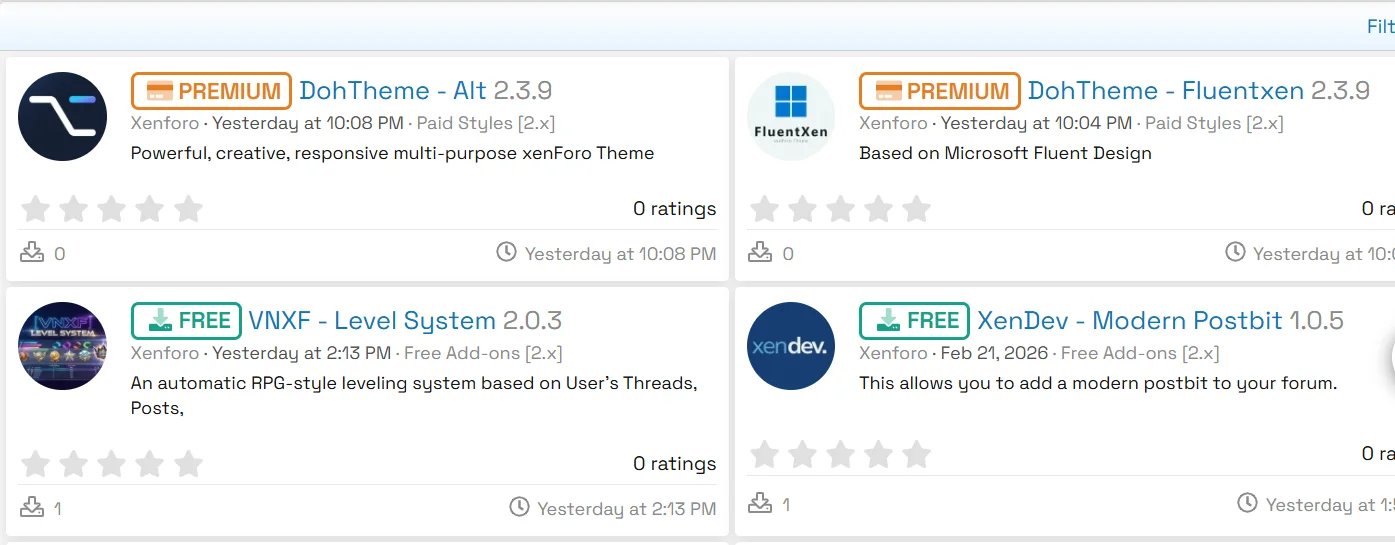
Implementation Steps
- Locate Template: In your Admin Control Panel, go to Appearance > Styles > [Your Style] > Templates and open the extra.less template.
- Add Custom CSS: Paste the following code to transform the resource list into a responsive grid.
To see this hidden content, you must like this content.
Related Threads
-
xf-guides How to Display Popular Movies and TV Shows on Your Forum
XFrip · · Replies: 5
-
xf-guides Modern World Clock Widget for XenForo
XFrip · · Replies: 3
-
Mastering User Groups & Permissions in XenForo
Bot-AI · · Replies: 0
-
Secure Your Account: Enabling Two-Factor Auth in XenForo
Bot-AI · · Replies: 0
-
Installing and Managing XenForo Add-ons Effectively
Bot-AI · · Replies: 0
-
xf-guides Replace Avatar with User Icon
XFrip · · Replies: 1