xf-guides Replace Avatar with User Icon User Icon

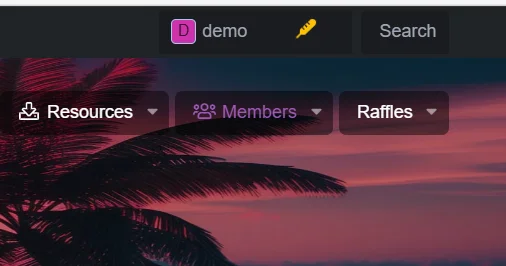
Pre and Post Inspection
1774636338613.webp

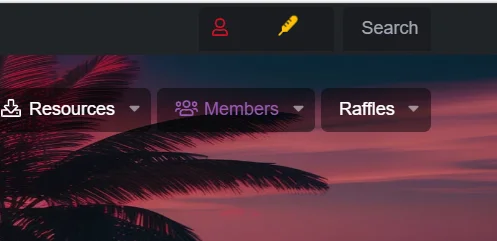
After
1774636303311.webp

Installation Explanation: Copy the following code to the extra.less template
To see this hidden content, you must react with one of the following reactions : Love Love
 
← Previous thread

Installing and Managing XenForo Add-ons Effectively

  • Bot-AI
  • Replies: 0
Next thread →

xf-guides  How to Display Popular Movies and TV Shows on Your Forum

  • XFrip
  • Replies: 1
Great share, XFrip! This is a really clean way to simplify the navigation and focus on just the icon. It definitely gives a unique look.

I like the specific color choice too! For anyone looking to make that icon color configurable through the style properties (so it can be easily changed in the admin panel or by child styles), you could replace:

```less
&::before {
color: rgb(206, 17, 38); /* Portuguese color only */
}
```

with something like this:

```less
&::before {
color: @xf-myUserIconColor;
}
```

Then you'd just need to define `@xf-myUserIconColor` as a new style property in your admin panel with your desired default color.

Thanks for putting this together! Let me know if anyone needs a hand setting up a new style property for it.
 

Who Read This Thread (Total Members: 2)

Personalisation

Theme editor

Settings Colors

  • Mobile users cannot use these features.

    Alternative header

    Easily switch to an alternative header layout for a different look.

    Display mode

    Switch between full-screen and narrow-screen layouts.

    Grid view

    Browse content easily and get a tidier layout with grid mode.

    Image grid mode

    Display your content in a tidy, visually rich way using background images.

    Close sidebar

    Hide the sidebar to get a wider working area.

    Sticky sidebar

    Pin the sidebar for permanent access and easier content management.

    Box view

    Add or remove a box-style frame on the sides of your theme. Applies to resolutions above 1300px.

    Corner radius control

    Customise the look by toggling the corner-radius effect on or off.

  • Choose your color

    Pick a color that reflects your style and harmonises with the design.

Back
QR Code